
I. INTRODUCTION
As summer temperatures rise, laptops are pushed closer to their thermal limits. What feels like a small increase in room temperature can significantly impact internal components, especially if your device hasn’t been cleaned in a while. Laptop overheating becomes one of the most common problems during summer months, often catching users off guard when performance suddenly drops or the system shuts down unexpectedly.
This is why preventive maintenance—such as cleaning laptop fans before summer—matters just as much as financial protection. Pairing good maintenance habits with an extended warranty for laptop and damage protection for laptop ensures that even if overheating causes internal damage, you’re not left paying hefty repair bills out of pocket.
II. UNDERSTANDING LAPTOP OVERHEATING
Laptop overheating doesn’t happen overnight. It’s usually the result of multiple small issues building up over time. Internal heat generated by the CPU and GPU needs to be pushed out constantly, and when this process fails, temperatures rise rapidly.
Modern laptops are compact, powerful, and often pushed hard for work, gaming, or streaming. Without proper cooling, the internal heat has nowhere to go, making overheating a recurring summer issue.
A. Common Causes of Overheating
The most frequent causes include dust buildup, aging thermal paste, high ambient temperatures, and heavy multitasking. Even a well-designed cooling system can fail if airflow is restricted.
Another overlooked factor is surface placement. Using laptops on beds, cushions, or laps blocks ventilation, trapping heat inside the device.
a. Dust Buildup in Cooling Fans
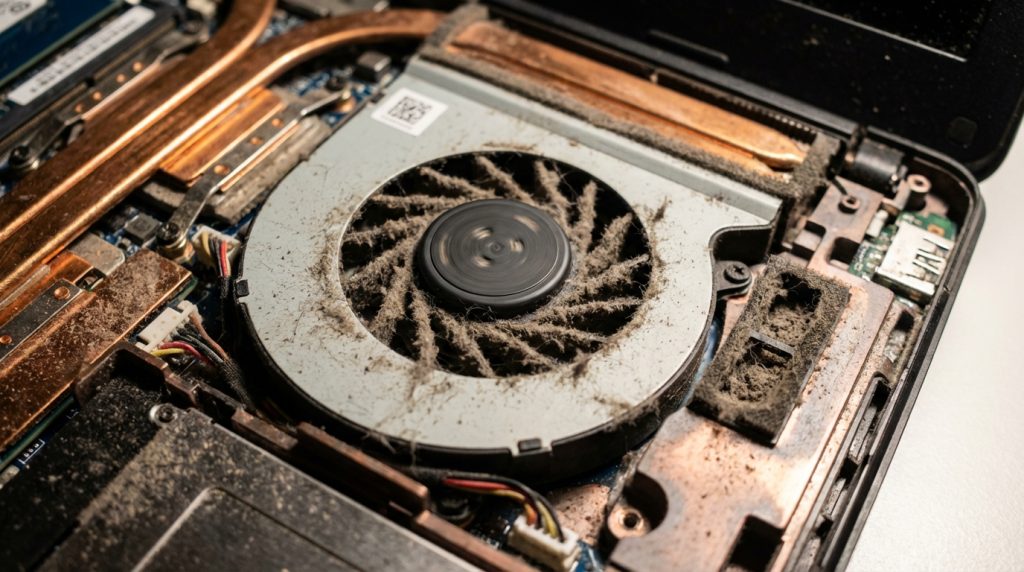
Dust is the silent killer of laptop cooling systems. Over time, dust settles on fan blades and vents, reducing airflow. Fans then work harder, spin faster, and still fail to cool the system effectively.
This not only increases internal temperatures but also accelerates wear and tear. Cleaning fans regularly can significantly reduce the chances of overheating-related hardware damage.
b. Poor Airflow and Ventilation
Blocked vents and cramped workspaces prevent proper heat dissipation. When hot air cannot escape, it circulates inside the laptop, increasing stress on internal components like the motherboard and processor.
III. HOW DIRTY FANS DAMAGE YOUR LAPTOP
Ignoring fan cleaning can lead to long-term damage. Excessive heat directly affects sensitive electronic components, shortening their lifespan and increasing failure rates.
A. Impact on Internal Components
Persistent overheating can degrade the CPU and GPU, weaken solder joints on the motherboard, and even cause battery swelling. These are not minor issues—they often require expensive part replacements.
Without an extended warranty for laptop, such repairs can cost nearly as much as buying a new device.
B. Performance Throttling and Sudden Shutdowns
To protect itself, your laptop automatically reduces performance when temperatures rise—a process known as thermal throttling. Apps slow down, games lag, and productivity suffers.
In extreme cases, the system shuts down suddenly to prevent permanent damage, risking data loss and workflow disruption.
IV. CLEANING LAPTOP FANS: A PRE-SUMMER ESSENTIAL
Cleaning your laptop fans before summer is one of the simplest and most effective ways to prevent overheating. It restores airflow and helps your cooling system work as intended.
A. Benefits of Regular Fan Cleaning
Regular cleaning lowers operating temperatures, reduces fan noise, and improves overall system stability. A cooler laptop performs better, lasts longer, and is less likely to suffer heat-related failures.
This small maintenance step can save you from major repair headaches later.
B. DIY Cleaning vs Professional Servicing
DIY cleaning using compressed air can help with surface dust, but improper handling may damage internal parts. Professional servicing ensures deep cleaning, proper inspection, and even thermal paste replacement when needed.
If your laptop is still under an extended warranty for laptop, professional servicing also helps maintain eligibility for future claims.
V. ROLE OF EXTENDED WARRANTY FOR LAPTOP
An extended warranty steps in after the manufacturer’s warranty expires, protecting you from unexpected hardware failures that can arise due to prolonged heat exposure.
A. What an Extended Warranty Typically Covers
An extended warranty for laptop generally covers motherboard issues, processor failures, display problems, and other internal hardware faults. This significantly reduces repair costs and ensures access to authorized service centers.
For users in hot climates or those who use laptops intensively, extended coverage is a smart investment.
B. Overheating-Related Repairs and Exclusions
While manufacturing defects and internal failures are covered, damage caused by negligence may not be. This is why regular maintenance—like fan cleaning—is important to keep warranty claims valid.
Understanding policy terms ensures you’re fully protected when you need it most.
VI. DAMAGE PROTECTION FOR LAPTOP AND HEAT ISSUES
Warranty alone isn’t always enough. That’s where damage protection for laptop plans come in.
A. Difference Between Warranty and Damage Protection
An extended warranty focuses on internal hardware failures, while damage protection for laptop covers accidental incidents like liquid spills, power surges, and certain heat-related damages.
Together, they provide comprehensive coverage against both mechanical failure and real-world accidents.
B. Protection Against Accidental and Heat-Related Damage
Damage protection can cover scenarios where overheating leads to sudden component failure or is triggered by environmental factors. This added layer of security ensures you’re not financially exposed during unexpected breakdowns.
VII. PREVENTIVE TIPS TO AVOID OVERHEATING
A. Proper Laptop Placement
Always use your laptop on a flat, hard surface to ensure proper airflow. Avoid direct sunlight and consider using a cooling pad during peak summer heat.
Small changes in placement can make a big difference in temperature control.
B. Maintenance Habits for Long-Term Safety
Schedule regular cleaning, monitor internal temperatures, keep software updated, and avoid overloading your system unnecessarily. Combining these habits with an extended warranty for laptop and damage protection for laptop creates a complete safety net.
FAQ
- How often should I clean my laptop fans?
Ideally every 6–12 months, or more frequently if you live in a dusty or hot environment. - Can overheating permanently damage my laptop?
Yes, prolonged overheating can damage internal components and shorten your laptop’s lifespan. - Does an extended warranty for laptop cover overheating issues?
It may cover internal hardware failures caused by heat, depending on policy terms and maintenance history. - Is damage protection for laptop necessary if I already have a warranty?
Yes, because damage protection covers accidents and scenarios not included in standard warranties. - Is professional cleaning worth it?
Absolutely, especially for older laptops or devices still under warranty, as it ensures safe and thorough maintenance.
VIII. CONCLUSION
Summer heat and dust-clogged fans are a dangerous combination for laptops. Cleaning your fans before summer is a simple step that can prevent overheating, performance loss, and costly repairs.
When paired with an extended warranty for laptop and damage protection for laptop, you gain both preventive and financial protection. Smart maintenance plus the right coverage ensures your laptop stays cool, reliable, and protected—no matter how high the temperatures rise.